

MTMIS Punjab Vehicle Verification : Step-by-Step Guide 2026
Are you looking to verify your vehicle’s details or ensure the authenticity of a used vehicle before purchase? The vehicle verification process can often feel overwhelming, but MTMIS Punjab is here to make it simple, quick, and stress-free.
The Punjab Excise, Taxation, and Narcotics Control Department offers an efficient online service for vehicle verification. This tool empowers individuals by providing instant access to key information about any registered vehicle in the province.
Here’s a step-by-step guide to performing your online vehicle verification using MTMIS Punjab:
Online Vehicle Verification Punjab: Step-by-Step Guide
Performing online vehicle verification is a simple and quick process. Follow these steps to verify car information by using the MTMIS Punjab Vehicle verification system:
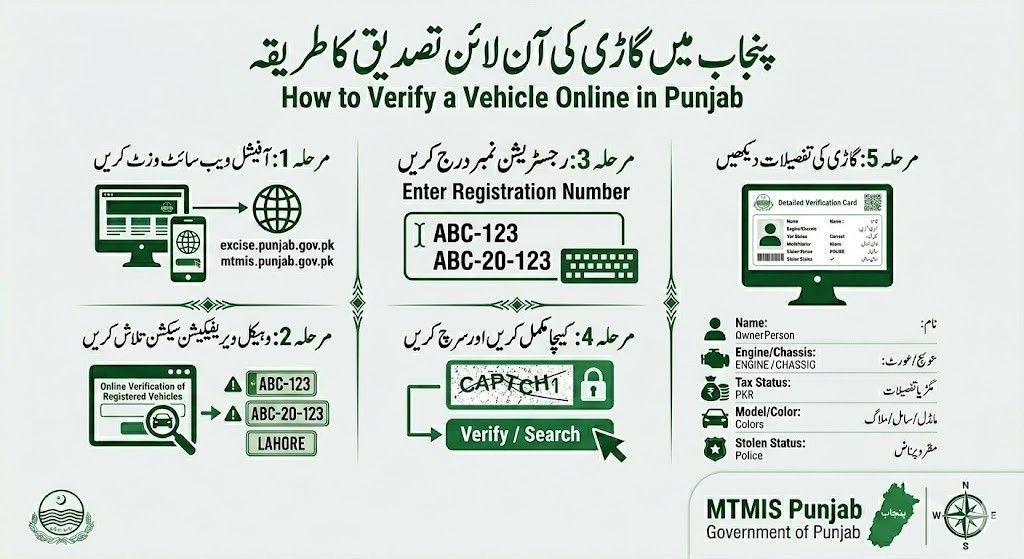
1.Click on this button that is located below or search for the MTMIS Punjab on your search engine to access the official Punjab Excise and Taxation Department website.
If you have access to the vehicle verification page by clicking this link it will automatically will redirect you to the exact page to check car information or if you have used the second way so you have to Navigate to the ‘Vehicle Verification’ section by searching it.

2. Here, you will see a fileds to enter the Vehicle number and chassis number for continuing the process of vehicle verification. Enter your car registration number (you can use any format, examples, LXZ 123 LXZ-123 LXZ0123 LXZ 0123). After entering the registration number, add the chassis number. This is required to complete vehicle verification in Punjab. Next, enter the captcha code. If the captcha is unclear, you can refresh it to generate a new one. Then, type the new code into the captcha field and click ‘Search’ or ‘Verify’ to check the vehicle information.
If you enter incorrect details, the system will display a ‘No vehicle found’ error, so make sure all information is entered correctly.
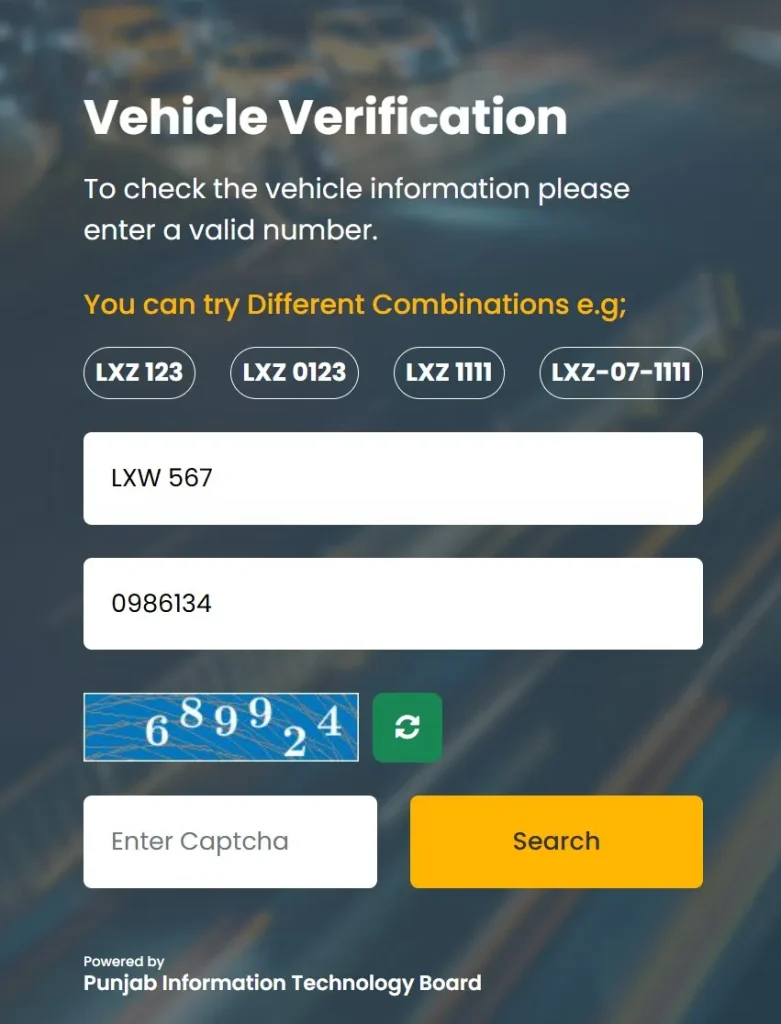
3. View the displayed information, which includes the vehicle’s registration, owner details, tax status, and any reported issues (such as being stolen).
This process can be completed within minutes, providing users with all the necessary information to make informed decisions.
How to Perform Online Vehicle Verification Punjab by CNIC
MTMIS Punjab also allows users to verify a vehicle using the owner’s CNIC (Computerized National Identity Card) number. This feature is particularly useful for individuals looking to confirm ownership details. Follow these steps:
1. Go to the MTMIS Punjab portal or click on this button to access the portal for doing the vehicle verification.
2. Here, choose the type of vehicle four-wheel or two-wheel. After selecting the vehicle type.
3. In the field of Please Enter CNIC No: Enter the CNIC number (Without dashes) associated with the vehicle’s registration. Double check the CNIC number to prevent from getting wrong information or errors while doing vehicle verification.
3. Verify your identity by clicking I’m not a robot.
4. Click on ‘Search’ to retrieve details such as ownership, registration status, and vehicle history.

Online Vehicle Verification Punjab for Motorcycles and Other Vehicles
In addition to cars, MTMIS Punjab also supports verification for bikes and other vehicles such as trucks, buses, and commercial vehicles. The process is the same as it is for cars, users need to input the vehicle registration number, and they will instantly receive all relevant details. This feature ensures that all types of vehicles, from personal to commercial, can be verified through a single platform.
Punjab Vehicle Verification App
To make vehicle verification even more convenient, the Punjab Excise and Taxation Department has launched a mobile app. The app allows users to verify vehicles on the go using their smartphones. Available for both Android and iOS devices, the app offers the same features as the web platform, including vehicle verification, tax status checks, and ownership details. This mobile access ensures users can perform vehicle verifications anytime, anywhere, without needing a computer.
Benefits of Using MTMIS for Punjab Motor Vehicle Verification
MTMIS Punjab offers several key benefits to vehicle owners and buyers:
Enhanced Transparency
Whether you’re verifying your own vehicle or one you’re planning to buy, MTMIS ensures that the data provided is reliable and transparent. This builds trust and confidence in vehicle-related transactions.
Fraud Prevention
MTMIS helps protect buyers by offering accurate and transparent vehicle data. Before purchasing a used vehicle, you can check its registration history, ownership records, and tax status, reducing the risk of fraud or scams.
Easy Document Tracking
MTMIS simplifies the process of tracking essential vehicle-related documents, such as smart card tracking, application tracking or transfer details. It centralizes all the necessary information, making it easily accessible.
Time-Saving
Gone are the days of standing in long queues or navigating cumbersome paperwork. MTMIS Punjab offers an online platform where you can verify vehicle details anytime, anywhere. This saves valuable time and makes the process simple to do.
Accurate Tax Compliance
The platform allows vehicle owners to stay informed about their tax payments and dues. By verifying your vehicle’s tax status, you can ensure compliance and avoid penalties or legal issues.
Supports Law Enforcement and Road Safety
By maintaining accurate and up-to-date vehicle records, MTMIS Punjab contributes to improved road safety and law enforcement. It enables authorities to monitor vehicle ownership and compliance, ensuring a safer driving environment for all.
Common Issues in Punjab Vehicle Verification and Solutions
While the MTMIS Punjab platform is highly efficient, users may occasionally encounter issues. Here are some common problems and their solutions:
Incorrect Registration Number
Double-check the registration number entered for any typos or errors. If the vehicle is newly registered, the details may take time to appear in the system.
Data Not Found:
This can occur if the vehicle is not registered in Punjab or if the registration records have not been updated. Contact the Excise Department for further assistance.
Unpaid Taxes
If the vehicle’s tax status shows as unpaid, it’s crucial to clear outstanding payments to avoid penalties or legal action.
If you encounter issues, you can contact the Punjab Excise and Taxation Department for support.
FAQ: Punjab Vehicle Verification
Now you know how to verify the details of various types of vehicles, whether it’s a car, motorcycle, scooter, truck, or bus. With MTMIS Punjab, you can easily perform vehicle verification using methods like entering the vehicle’s registration number or CNIC number on the official website or app. This ensures transparency and accuracy, making it easier to buy, sell, or simply check your vehicle’s legal status.
If you need further assistance or want more detailed information, download the MTMIS Punjab app or visit their official website. Stay informed and make confident decisions with the convenience and reliability of MTMIS Punjab.